

To protect against negative SEO, set up backlink monitoring in Google Search Console, enable security alerts on your site, harden your login and server (two-factor authentication, regular updates, a web application firewall), and keep a disavow file ready for confirmed attacks. Google already ignores most spammy links automatically, so the real protection is early detection — not panic.
On this page
- What Negative SEO Actually Looks Like
- How to Tell an Attack from Normal Link Noise
- Set Up Your Early Warning System
- Harden Your Site Against Hack-Based Attacks
- The Disavow Tool: When to Use It and When Not To
- Protect Your Content from Scraping and Duplication
- Build a Link Profile That Absorbs Attacks
- Negative SEO Protection Checklist
- Frequently Asked Questions
Negative SEO sounds scary, and some of the fear is justified. A competitor pointing thousands of toxic backlinks at your site, scraping your content, or hacking your pages can cause real damage. But most site owners overestimate the risk and underestimate their own defenses. This guide walks through what negative SEO actually looks like, how to tell a real attack from normal internet noise, and the exact steps to protect your site.
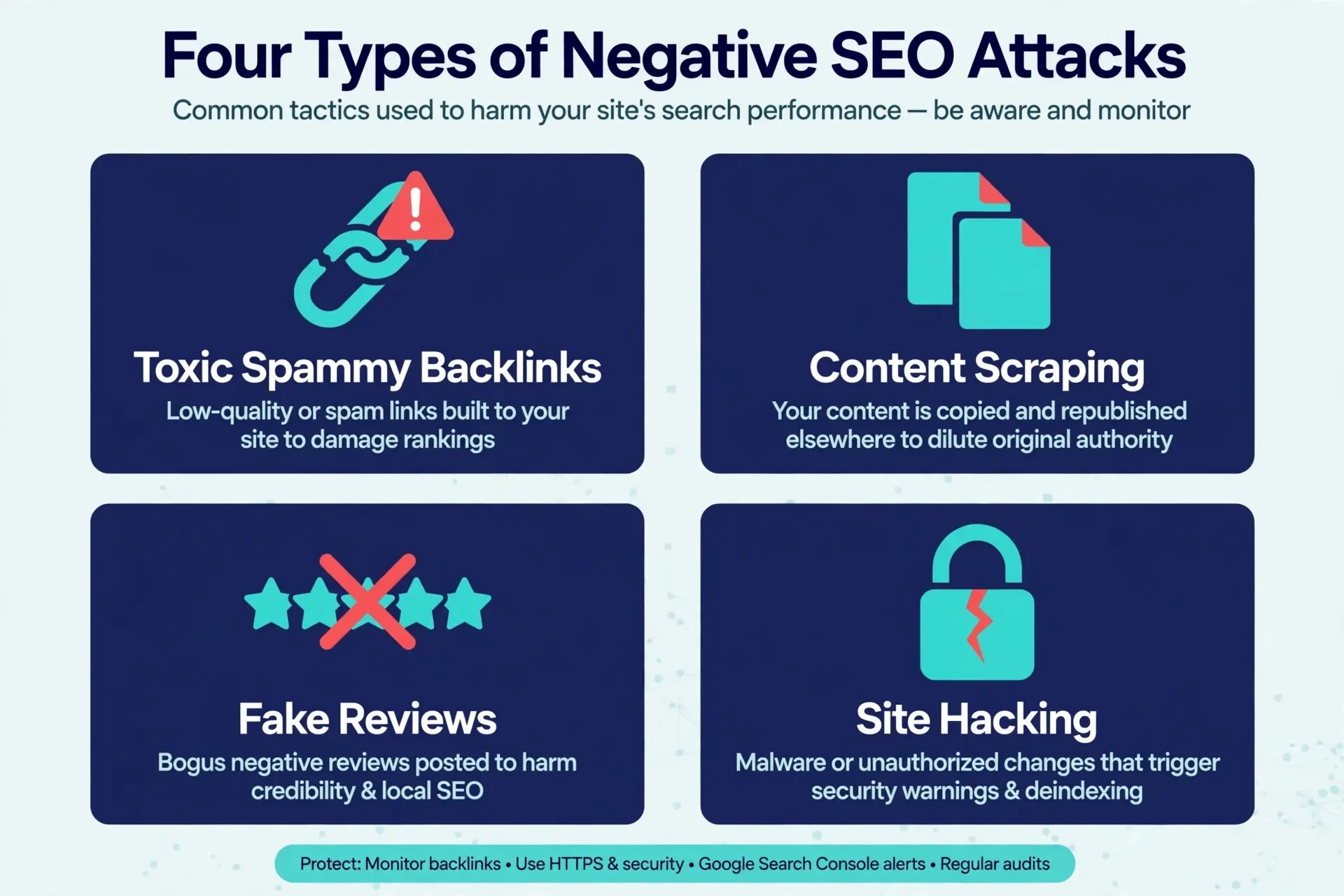
What Negative SEO Actually Looks Like
Negative SEO is the deliberate use of black-hat tactics against someone else’s website to damage its search rankings. It is not a single technique — it is a category of attacks, and understanding which type you are dealing with determines your response.
The most common attack is toxic link spam. An attacker uses automated tools to point thousands of low-quality backlinks at your site — links from link farms, foreign-language spam directories, and hacked pages, often with exact-match anchor text for your target keywords. The goal is to make your link profile look manipulated. See our guide on toxic backlink cleanup for what these look like up close.
Content scraping is the second most common attack. Scrapers copy your articles and republish them on spam networks, sometimes outranking you for your own content. AI-powered scrapers can now copy and republish within hours of publication.
Fake reviews and brand attacks target reputation rather than rankings directly. Coordinated fake negative reviews on your Google Business Profile can drop local pack rankings within days.
Hacking-based attacks are the most severe. An attacker with site access can inject hidden spam links, add malicious redirects, or insert doorway pages — potentially getting your site flagged for malware in search results.
You cannot prevent someone from trying to attack your site. What you control is detection speed and response effectiveness.
How to Tell an Attack from Normal Link Noise
Here is something most guides skip: every website accumulates spammy backlinks naturally. That is normal internet background noise — not an attack.
A real attack has patterns normal noise does not. Look for these four signals together:
Sudden velocity spikes. Your site normally gains a handful of referring domains per week; suddenly hundreds appear within days from unrelated sites. Check your link velocity baseline first. Concrete check: export referring domains from Search Console, sort by “first seen” date, and look for clusters appearing on the same dates.
Coordinated anchor text. Attack links often use exact-match commercial anchors — the keywords you rank for — to make it look like you built manipulative links. Fifty new links all using “best cheap laptops” when you sell laptops is a pattern.
Timing correlation with ranking drops. A link spike followed within days by a traffic drop is the strongest signal. If the spike happened three months ago with no ranking impact, Google probably already ignored those links.
Domain quality clustering. Attack links tend to come from the same type of source — a PBN network, a batch of hacked sites, or one link farm. Normal noise is random; coordinated sources suggest coordination.
Before acting, verify. Document everything — screenshots, dates, domain lists — before touching the disavow tool.
Set Up Your Early Warning System
Protection starts with detection. An attack caught in week one is a nuisance; the same attack found in month three is a recovery project.
Google Search Console is your first line of defense — and free. In the Links report, check top linking sites monthly for unfamiliar domains in the top 50. Turn on email notifications under Settings, then Preferences — Google will alert you to manual actions, security issues, and malware warnings. For deeper link auditing, see checking your backlink profile. Google’s own Search Central security documentation covers the alert types to enable.
Set up Google Alerts for your brand and domain. Create alerts for your brand name, domain, and key product names. This catches unlinked mentions, forum discussions, and scraper sites. Five minutes to set up, runs forever.
Monitor rankings weekly, not daily. Weekly checks give a clean signal: a sudden multi-position drop across several keywords in the same week warrants investigation. Pair with Google Analytics — check referral traffic monthly for unusual domains.
Use a backlink monitoring tool for automation. Ahrefs, Semrush, and Majestic offer new-backlink alerts. Set a threshold (e.g., 20% above your 3-month average referring domain count) to turn silent attacks into phone notifications. Search Engine Land’s negative SEO guide walks through detection workflows that complement these alerts.
Scan for duplicate content monthly. Use Copyscape or Siteliner on your top 10 traffic pages to catch scrapers early.
Harden Your Site Against Hack-Based Attacks
Link spam gets headlines, but hacking causes the most severe damage — malware flags, deindexing, or your site turned into a link farm overnight. Most hacks exploit basic, preventable weaknesses.
Keep everything updated — CMS, themes, plugins. Most WordPress hacks exploit known vulnerabilities in outdated plugins, not zero-day attacks. Enable automatic updates for minor releases at minimum. One outdated contact form plugin is all an attacker needs.
Enforce strong authentication everywhere. Unique passwords plus two-factor authentication on your CMS admin, hosting panel, domain registrar, and Google accounts. Limit login attempts and consider changing the default WordPress login URL.
Deploy a web application firewall (WAF). Cloudflare or Sucuri block malicious requests before they reach your server — SQL injection, cross-site scripting, DDoS. Cloudflare’s free tier covers the basics.
Set up automated backups you actually test. Store backups off-server and restore one to staging quarterly. An untested backup is a hope, not a plan.
Monitor file integrity. Security plugins like Wordfence alert you when core files change unexpectedly. If your .htaccess or robots.txt is modified without your action, investigate immediately.
The Disavow Tool: When to Use It and When Not To
Google’s Disavow Tool lets you tell Google to ignore specific backlinks. It is powerful, widely misunderstood, and dangerous when misused.
Google already ignores most spammy links automatically. If you have a handful of spammy links — which every site does — you almost certainly do not need this tool. Google’s own documentation says most sites will never need it.
Use the disavow tool only in these situations:
You received a manual action for unnatural links in Search Console. This is the clearest case — Google has told you directly that links are a problem, and disavowing is part of the recovery process alongside a reconsideration request.
You have documented evidence of a coordinated negative SEO attack — a sudden spike of clearly manipulative links (PBN networks, link farms, hacked sites) with exact-match anchors, correlated with ranking drops. Not “some spammy links appeared” but a verified pattern matching the detection criteria from the earlier section.
You inherited a toxic link history from a previous owner or a past SEO agency that built manipulative links, and outreach to remove them has failed.
Before disavowing, always attempt manual removal first. Contact the linking site’s webmaster and request removal. For spam operations this rarely works — link farms have no real contact — but document your attempts. This documentation matters if you ever need to file a reconsideration request.
When you are ready, create a plain text file (UTF-8), one entry per line. Use domain: for entire domains, or a full URL for specific pages:
# Negative SEO attack - spam network identified 2026-10-01
# Documented outreach attempts: no valid contact found
domain:spam-link-farm-example.com
domain:cheap-links-network.net
https://specific-spam-site.com/bad-page-linking-to-me
# End of file
Upload it via Search Console under Links, then Disavow Links. Be conservative. Start with the clearest spam domains, monitor 4-6 weeks, then expand only if needed. For the full process, see how to disavow backlinks.
The biggest disavow mistake I see: site owners disavowing based solely on a third-party “toxicity score” without manual review. Automated scores flag legitimate links regularly — directories, press mentions, and foreign-language sites that linked to you naturally. Moz’s spam score documentation explains what these scores actually measure and their limitations. A toxicity score is a starting point for investigation, not a disavow list. Review every domain before adding it.
Protect Your Content from Scraping and Duplication
Content scraping is the attack most likely to hit publishers, and AI tools are making mass scraping trivial.
Establish yourself as the original source. Every page needs a self-referencing rel="canonical" tag. Include the original publication date in article schema — Google uses dates as an originality signal. Keep consistent author bylines.
Publish and index fast. Submit new URLs for indexing immediately via Search Console and ensure your XML sitemap updates automatically. If Google indexes your version before scrapers copy it, they struggle to outrank you.
Monitor with Alerts and Copyscape. Alert on distinctive sentences from top pages — unique phrases a scraper would copy verbatim. Run monthly Copyscape scans.
File DMCA takedowns promptly. Use Google’s legal removal request tool; for major platforms (WordPress.com, Blogger), file with the host directly — most comply within 48 hours. Document everything.
Build internal links defensively. A page with strong internal links from established pages is harder to outrank with a scraped copy. Link new content from 2-3 relevant existing pages at publish time.
Build a Link Profile That Absorbs Attacks
Here is the most underrated defense: a large, diverse, naturally-earned backlink profile is itself armor. When Google evaluates a wave of suspicious links, context matters.
Site A has 50 referring domains earned over two years. Suddenly 500 spammy domains link to it in a week — that pattern screams manipulation. Site B has 5,000 diverse referring domains built over five years. The same 500 spammy links arrive, but against that legitimate authority they read as noise, not signal.
This means consistent, legitimate link building is a defensive investment. Do not pause link building because you fear negative SEO — the opposite. Keep earning links while disavowing spam; a site that keeps growing legitimate authority while cleaning spam looks healthy.
Diversify anchor text naturally as you build — branded, naked URLs, generic phrases, topical keywords. A diverse existing profile dilutes the impact of an exact-match anchor flood.
Negative SEO Protection Checklist
Everything in this guide condensed into an actionable checklist. Work through it once to set up your defenses, then revisit quarterly.
| Area | Action | Frequency | Priority |
|---|---|---|---|
| Monitoring | Enable Google Search Console email notifications | Once | Critical |
| Monitoring | Set up Google Alerts for brand name and domain | Once | High |
| Monitoring | Configure backlink spike alerts in Ahrefs/SEMrush | Once | High |
| Monitoring | Review new referring domains in Search Console | Monthly | High |
| Monitoring | Check rankings for sudden multi-keyword drops | Weekly | High |
| Monitoring | Scan top pages for scraped duplicates (Copyscape) | Monthly | Medium |
| Security | Update CMS, themes, and all plugins | As released | Critical |
| Security | Enable two-factor authentication on all admin accounts | Once | Critical |
| Security | Deploy a web application firewall (Cloudflare/Sucuri) | Once | High |
| Security | Set up automated off-server backups and test restores | Quarterly test | High |
| Security | Monitor file integrity (.htaccess, robots.txt changes) | Ongoing | Medium |
| Content | Ensure canonical tags on every page | Once (audit) | High |
| Content | Submit new URLs for immediate indexing | Per publish | Medium |
| Links | Document baseline link velocity (3-month average) | Once | High |
| Links | Keep disavow file template ready (don’t submit preemptively) | Once | Medium |
| Links | Continue earning legitimate links (defensive building) | Ongoing | High |
| Brand | Monitor review platforms for fake review patterns | Monthly | Medium |
Verdict: If you only do five things, do these: Search Console notifications, Google Alerts, plugin updates, two-factor authentication, and monthly backlink reviews. Those five cover the vast majority of real-world attack scenarios.
Frequently Asked Questions
Can negative SEO actually hurt my rankings in 2026?
Yes, but less than most people fear. Google now ignores most spammy links automatically. A few hundred toxic links pointed at an established site typically have zero impact. Real damage usually needs a massive coordinated attack, a hack, or a site with an already-weak link profile.
Should I disavow every spammy link I find?
No. Aggressive disavowing can hurt more than the spam, because toxicity scores regularly flag legitimate links. Only disavow with a manual action in Search Console, documented evidence of a coordinated attack, or an inherited toxic history. For normal background spam, let Google handle it.
How do I know if I am under a negative SEO attack?
Look for four signals together: sudden referring-domain spikes far above your normal velocity, coordinated exact-match anchors targeting your money keywords, timing correlation between the spike and a traffic drop, and clustering from the same spam source type. One signal alone is usually noise.
Is negative SEO illegal?
Not explicitly in most jurisdictions, but many tactics cross legal lines — hacking violates cybercrime laws, fake reviews can be defamation, scraping violates copyright. Spammy link building is not criminal but violates Google’s guidelines. For hacking or defamation attacks, consult a lawyer.
Can a negative SEO attack get my site deindexed?
Extremely unlikely through link spam alone. Deindexing typically requires a successful hack (malware/redirects triggering Safe Browsing warnings) or a manual action for severe violations. Link-based attacks almost never cause deindexing — at worst, recoverable ranking drops.
How long does recovery take?
Link spam with a proper disavow typically stabilizes in 6-8 weeks; full recovery can take months as Google recrawls. Hacking-based attacks recover faster once cleaned — often days to weeks. Detection speed is the key variable: week-one discovery resolves far faster than month-three.
Done-for-you podcast backlinks
Get your brand on Apple Podcasts, Spotify, Amazon and 25 more trusted platforms — placed by hand, reported link by link.