
On this page
- What Is SEO? (The 2-Minute Explanation)
- How Search Engines Actually Work
- The 3 Pillars of SEO
- SEO for Beginners: Your 30-Day Starter Plan
- On-Page SEO Tutorial for Beginners (The Essentials)
- Off-Page SEO Tutorial for Beginners (Getting Your First Backlinks)
- SEO for Shopify Beginners (Platform Quick Start)
- Write Content Google Loves (SEO Content Writing Basics)
- Beginner SEO Mistakes That Waste Months
- FAQ: SEO for Beginners
- SEO for Beginners: Quick-Reference Checklist
- Your Next Step
If you’ve ever wondered how some websites always show up first on Google while yours sits on page 10, this guide is for you. SEO for beginners doesn’t have to be confusing — and by the end of this article, you’ll have a clear, step-by-step plan to start ranking.
Here’s the promise: no jargon dumps, no theory without action. Just a practical roadmap — including a 30-day starter plan — that takes you from zero to your first real SEO wins.
What Is SEO? (The 2-Minute Explanation)
SEO stands for Search Engine Optimization. In plain English, it means making your website easy for Google to understand and worthy of ranking high in search results.
Google’s job is to show searchers the best answer; your job is to make your page that answer. Do it consistently and Google rewards you with free, ongoing traffic.
The simple formula behind all of SEO:
Relevance + Authority + Good Experience = Rankings
- Relevance: Does your page actually answer what the searcher asked?
- Authority: Do other trustworthy sites vouch for you (through backlinks)?
- Experience: Is your site fast, mobile-friendly, and easy to use?
Everything in this guide improves one of these three things.
How Search Engines Actually Work
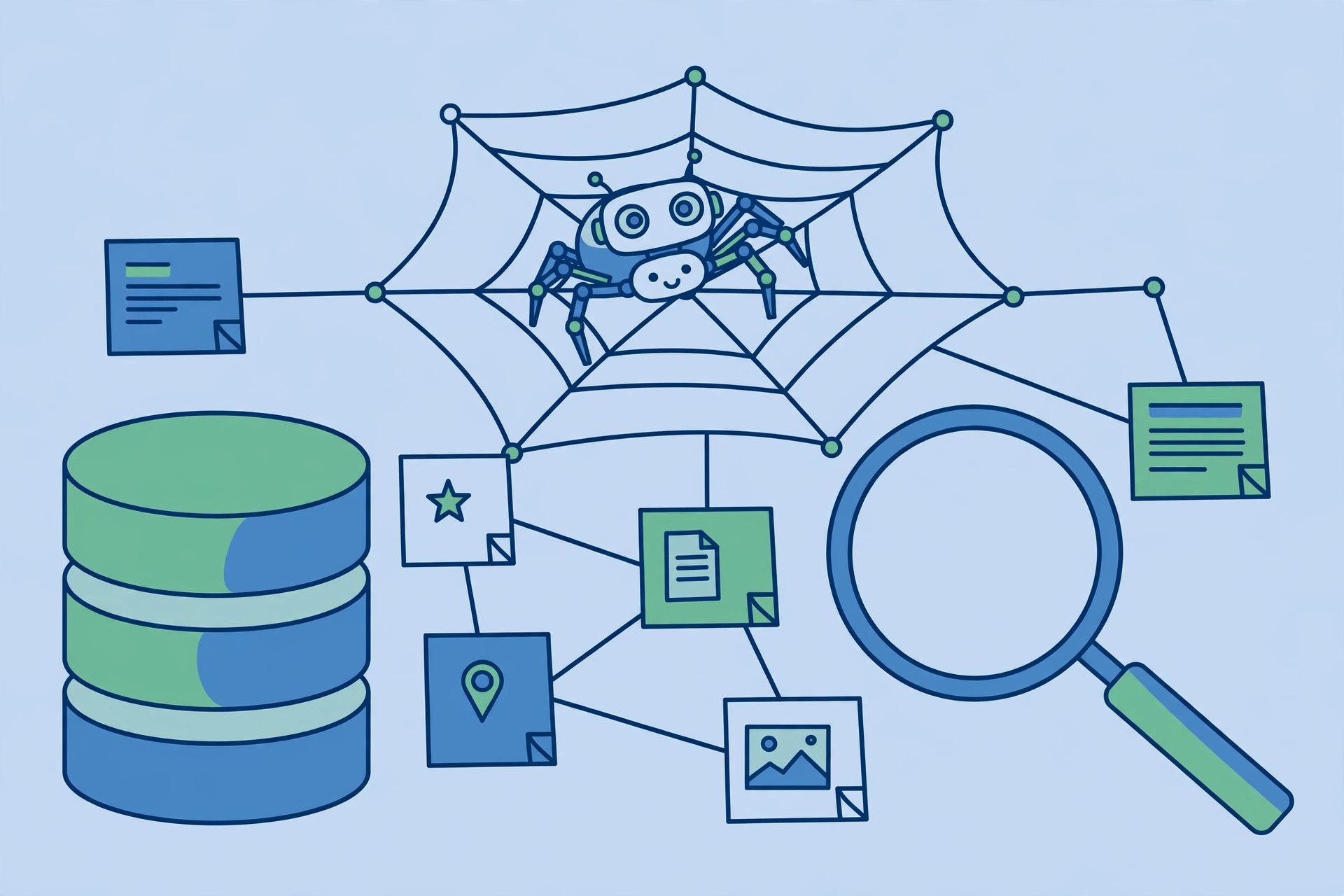
Before optimizing, understand what Google does. It happens in three stages:
Crawling (Discovering Pages)
Google’s automated programs called “crawlers” (spiders) follow links across the web to discover new and updated pages.
Why it matters for beginners: If Google can’t crawl your page (blocked by robots.txt, no internal links pointing to it, painfully slow), it can never rank — no matter how good the content is.
Indexing (Understanding and Storing Pages)
Once crawled, Google analyzes the page’s text, images, and structure, then stores it in its massive index.
Why it matters for beginners: Clear titles, headings, and descriptive content help Google understand your page. Confusing structure = poor indexing.
Ranking (Ordering Results)
When someone searches, Google pulls relevant pages from its index and orders them by hundreds of signals — relevance, authority, page experience, and more.
Why it matters for beginners: Every SEO task you’ll ever do is about helping Google at one of these three stages: be crawlable, be understandable, be the best answer.
The 3 Pillars of SEO
All of SEO fits into three pillars — learn this mental model once and you’ll never feel lost:
Pillar 1: On-Page SEO
Everything on your own pages: the words you write, how you structure them, your titles, images, and internal links. This is the pillar you control completely — and where beginners should start.
Key tasks: keyword research, title tags, heading structure, content quality, image optimization, internal linking. (Full on page SEO tutorial for beginners below.)
Pillar 2: Off-Page SEO
Signals from other websites — mainly backlinks (links from other sites to yours). Think of each quality backlink as a vote of confidence.
Key tasks: earning backlinks through great content, guest posting, outreach, and digital PR. (Full off page SEO tutorial for beginners below.)
Pillar 3: Technical SEO
The behind-the-scenes foundation: site speed, mobile-friendliness, crawlability, secure HTTPS, and structured data. You don’t need to be a developer — modern platforms handle most of this, but you should know the basics.
Key tasks: check mobile usability in Search Console, improve page speed, fix crawl errors, ensure HTTPS. Keep it light as a beginner; go deeper as you grow.
SEO for Beginners: Your 30-Day Starter Plan
Theory is nice; action ranks. Work through these steps in order:
Days 1–3: Set Up Your Measurement Tools
You can’t improve what you don’t measure — set up these two free tools on day one:
- Google Search Console — shows which keywords bring you traffic, indexing issues, and mobile problems. This is your SEO command center.
- Google Analytics 4 — shows what visitors do once they arrive (which pages they read, how long they stay).
Both are free and take under 30 minutes — do this before anything else.
Days 4–7: Pick Your First 5–10 Keywords
Don’t target “best shoes” on day one — you’ll compete with Nike. Instead, find low-competition, specific keywords where a new site can actually rank.
How:
- Write down 5 topics your site covers.
- For each, brainstorm the specific questions beginners ask (long-tail keywords).
- Check the competition: Google the keyword — if page one is all massive brands (DA 70+), skip it for now. If you see smaller blogs or forums ranking, that’s your opening.
- Use a free keyword research tool to check search volume.
Aim for keywords with clear intent and realistic competition. Five good keywords beat fifty impossible ones.
Days 8–12: Fix Titles and Meta Descriptions
Rewrite the title tags on your 5–10 most important pages using this formula:
Primary Keyword + Benefit/Hook (under 60 characters)
Example: instead of “Home,” use “Affordable Web Design for Small Businesses | [Brand].” Write a compelling meta description (under 160 characters) that makes searchers want to click.
This high-ROI task takes an afternoon and directly affects click-through rates.
Days 13–20: Publish or Improve 3–5 Helpful Pages
For each target keyword, make sure you have a page that genuinely answers the query better than what’s currently ranking.
- One primary keyword per page — don’t target five keywords with one thin page.
- Answer the question in the first 100 words, then go deep.
- Use clear H2/H3 headings so scanners can navigate.
- Add images with descriptive alt text.
Already have content? Improve it: update outdated info, add sections competitors miss, make it scannable.
Days 21–25: Build Your First Backlinks
With your on-page foundation solid, start earning authority signals:
- Submit to 5–10 relevant business directories.
- Claim and complete profiles (Google Business, LinkedIn, industry forums) with a link back.
- Write one guest post for a niche site (see our how to get backlinks guide).
- Try broken link building — find dead links on relevant sites and suggest your content as a replacement.
Never buy links. Paid links violate Google’s guidelines and can get your site penalized. Earn them instead.
Days 26–28: Check Technical Basics
Run through this quick technical checklist:
- Open Search Console → check “Pages” for indexing errors. Fix any you find.
- Confirm mobile usability — your site must work on phones.
- Test page speed — if your homepage takes over 3 seconds, compress images and remove heavy plugins.
- Confirm your site uses HTTPS (the padlock in the browser bar).
Days 29–30: Review and Plan Month Two
Look at Search Console: are impressions climbing? Any keywords starting to rank on pages 2–3? Those are your month-two targets — improve those pages further and build a few more links to them.
SEO compounds. Month one builds the foundation; months two and three are where momentum kicks in.
On-Page SEO Tutorial for Beginners (The Essentials)
Pillar 1 in practice — master these essentials:
One Keyword Per Page
Each page should target one primary keyword (plus natural variations) — one page chasing ten unrelated terms ranks well for none.
Title Tag Formula
Your title tag is the clickable headline in search results: primary keyword near the front + a compelling reason to click. Keep it under 60 characters.
Good: “SEO for Beginners: 30-Day Plan to Your First Rankings”
Bad: “Welcome to Our Website!!!”
H1/H2/H3 Structure
Use one H1 (your page title), H2s for main sections, H3s for subsections. Never skip levels — don’t jump from H1 to H4.
Image Alt Text
Every image needs descriptive alt text — it helps visually impaired users and gives Google context. Describe what’s actually in the image: “bar chart showing organic traffic growth over six months” beats “image1.”
Internal Linking Basics
Link pages to each other with descriptive anchor text — it helps Google discover content, passes authority, and keeps readers exploring. Aim for 2–5 internal links per article.
Clean URL Slugs
Keep URLs short and keyword-rich: yoursite.com/seo-for-beginners/ beats yoursite.com/p=12345?cat=7. Include your primary keyword, use hyphens between words, skip stop words.
Off-Page SEO Tutorial for Beginners (Getting Your First Backlinks)

Pillar 2: backlinks — links from other sites to yours — are Google’s trust signals. Not all links are equal:
- Quality beats quantity. One link from a respected industry site outweighs fifty from random directories.
- Relevance matters. A cooking blog linking to your SEO guide helps less than a marketing site linking to it.
- Editorial links win. Links given freely because your content is great beat links you placed yourself.
Beginner-Safe Link Building Tactics
1. Business and niche directories. Submit your site to legitimate directories in your industry. Easy, safe, and gives you foundational links.
2. Complete profile links. Fill out profiles on LinkedIn, Crunchbase, and industry forums — most allow a website link.
3. HARO (Help a Reporter Out). Journalists need expert quotes; you provide them and often earn a backlink from news sites. Free to join.
4. Guest posting. Write a genuinely useful article for a blog in your niche; in return, you typically get an author bio link. Focus on sites with real audiences, not link farms.
5. Resource page outreach. Find “resources” or “useful links” pages in your niche, then politely suggest your best content if it genuinely adds value.
For the deeper playbook, read our link building guide once you’ve nailed these basics.
The golden rule: if a link-building tactic feels spammy, it probably is. Google’s spam policies are clear — manipulative links can get your site penalized. When in doubt, earn links with great content instead of manufacturing them.
SEO for Shopify Beginners (Platform Quick Start)
Running a Shopify store? Your platform-specific shopify seo for beginners crash course:
- Use Shopify’s built-in SEO fields. Fill in the title tag and meta description on every product, collection, and page using the formula from the 30-day plan.
- Watch app bloat. Every app adds code that can slow your store — audit quarterly and remove unused apps.
- Optimize collections, not just products. Collection pages often outrank individual product pages; give each a unique description with its target keyword.
- Write unique product descriptions. Never use manufacturer copy — write 100+ words per key product to avoid duplicate content.
- Start a Shopify blog. Target informational keywords your customers search before buying (“how to choose running shoes”) — this is how small stores compete with giants through content, not ad spend.
Nail these fundamentals first — they cover most of what a Shopify store needs. Then expand into product structured data and collection-page internal linking.
Write Content Google Loves (SEO Content Writing Basics)
Content is where most beginners win or lose. The essentials:
- Match search intent first. Before writing, Google your target keyword. If page one is all how-to guides, don’t write a product page. Match the format searchers expect.
- Answer early, then expand. Put the core answer in the first 100 words (this also helps with AI Overviews), then go deep with examples, steps, and details.
- Structure for scanners. Most readers scan before they read. Short paragraphs, descriptive H2s, bullet points, and bold key phrases keep them on the page.
- Add something original. Data from your experience, screenshots, mini case studies, or a unique framework — anything competitors don’t have. Google’s 2026 updates explicitly reward information gain.
- One keyword, naturally woven. Use your primary keyword in the title, first paragraph, one H2, and a few times naturally. Never force it — keyword stuffing hurts readability and rankings.
Beginner SEO Mistakes That Waste Months
Learn from others’ mistakes instead of making them yourself:
Targeting Impossible Keywords First
Going after “best credit cards” with a brand-new blog is like challenging a heavyweight on your first day at the gym. Start with specific, low-competition terms and work up.
Keyword Stuffing
Repeating “seo for beginners” 50 times doesn’t help — it makes content unreadable and can trigger spam filters. Write naturally; Google understands synonyms and context.
Ignoring Search Console Data
Search Console shows which queries bring impressions and where you rank — check it monthly.
Building Spammy Links
Blog comment spam, link farms, and paid link schemes might give a quick bump — then a penalty that takes months to recover from. Check any site’s domain authority before pursuing a link, and prioritize relevance over raw numbers.
Expecting Results in Two Weeks
SEO typically takes 3–6 months to show results for new sites. The beginners who win keep publishing and improving while others quit at week three.
Redesigning Instead of Publishing
Tweaking your theme for the fifth time feels productive but ranks nothing — content and links rank. Don’t let perfectionism replace publishing.
No Internal Linking
Publishing articles in isolation wastes authority — every new post should link to 2–3 relevant older posts, and vice versa.
FAQ: SEO for Beginners
How long does SEO take for beginners?
Expect 3–6 months before meaningful organic traffic on a new site — though you’ll often see early signals (climbing impressions, page 2–3 rankings) within 4–8 weeks of consistent publishing.
Is SEO free?
The traffic is free — no paying Google per click. But SEO costs time and effort (content, outreach). You can start on a zero budget; paid tools just speed things up later.
Can I do SEO myself?
Absolutely. The fundamentals here — great content, clean on-page optimization, your first links — are all DIY-friendly. Agencies help when you’re scaling, not starting.
Do I need to know coding for SEO?
No. WordPress, Shopify, and Webflow handle the technical heavy lifting. Understand basics like title tags and redirects, but you don’t need to write code.
SEO for Beginners: Quick-Reference Checklist
Pin this checklist somewhere visible and run through it monthly until every item is second nature:
- ☐ Google Search Console + Analytics installed and verified
- ☐ 5–10 realistic starter keywords chosen (low competition, clear intent)
- ☐ Title tags rewritten on all key pages (keyword + hook, under 60 chars)
- ☐ Meta descriptions written for all key pages (compelling, under 160 chars)
- ☐ One H1 per page; H2/H3 hierarchy clean with no skipped levels
- ☐ Every image has descriptive alt text
- ☐ 2–5 internal links per article using descriptive anchor text
- ☐ URLs are short, keyword-rich, hyphen-separated
- ☐ Site loads in under 3 seconds on mobile
- ☐ HTTPS enabled site-wide
- ☐ First 3–5 backlinks earned (directories, profiles, or guest post)
- ☐ No keyword stuffing, no bought links, no duplicate content
Tick all twelve and you’re no longer a beginner — you’re a practitioner. Then scale what works.
Your Next Step
You now have the complete beginner framework: the 3 pillars, a 30-day action plan, on-page and off-page essentials, and the mistakes to avoid. Start today: set up Search Console, pick your first five keywords, fix one title tag. Small actions, done consistently, compound into rankings.
And when you’re ready to go deeper, explore our link building guide and best backlink checker roundup — both written for the same no-fluff, action-first approach.
Sources: Google’s SEO Starter Guide, Moz’s Beginner’s Guide to SEO, Ahrefs’ SEO Basics
Done-for-you podcast backlinks
Get your brand on Apple Podcasts, Spotify, Amazon and 25 more trusted platforms — placed by hand, reported link by link.